Last Tuesday, I spent three hours wrestling with an AI image generator, burning through 47 generation credits trying to create a simple product mockup for a client presentation. The results? A chaotic gallery of distorted proportions, inconsistent lighting, and subjects that looked vaguely related to what I'd described but missed the mark entirely.
The frustration wasn't the AI's capability—it was my prompts. I'd type "professional product photo with soft lighting," hit generate, and get something that looked like a fever dream interpretation of my vision. Too vague. Then I'd overcorrect with a paragraph-long prompt stuffed with technical jargon, and the AI would latch onto random details while ignoring my core concept. Too complex.
Here's what nobody tells you about AI image generation: the tool is only as good as your ability to communicate with it. You're essentially learning a new language—one where a misplaced adjective can turn "elegant minimalist interior" into "empty sad room," and where the difference between "cinematic lighting" and "dramatic lighting" produces wildly different results.
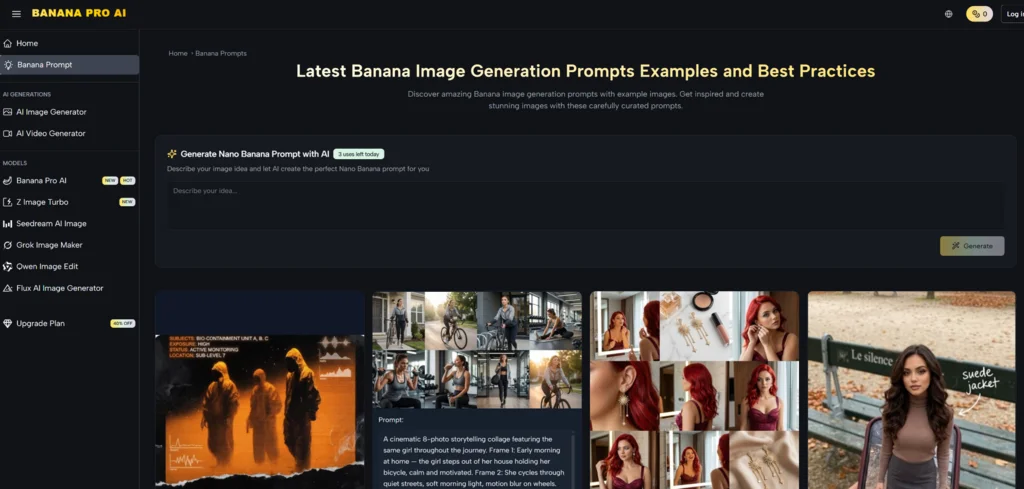
That realization led me down a path of discovering structured prompt libraries, and eventually to experimenting with Banana Prompts—a tool that fundamentally changed how I approach AI image generation. Not because it does the work for me, but because it taught me the architecture of prompts that actually work consistently.
I used to think successful AI prompts were about creativity—the more imaginative your description, the better the output. That's partially true, but I was missing something critical: structure matters more than vocabulary.
Think of AI image generators like professional photographers. If you tell a photographer "make it look good," you'll get their interpretation of "good," which might not match yours. But if you specify "shallow depth of field, golden hour lighting, subject positioned using rule of thirds," you're speaking their language, and the results align with your vision.
Through testing hundreds of variations, I've identified the elements that separate amateur prompts from professional ones:
The difference isn't just semantic—it's architectural. Structured prompts give the AI a hierarchy of priorities, while vague prompts force it to guess what matters most.
I'll be honest—when I first explored prompt libraries, I was skeptical. Most are just collections of successful prompts with no explanation of why they work. You copy-paste someone else's prompt, get a decent result, but learn nothing about adapting it for your specific needs.
What caught my attention about the Banana Prompts library was the level of structural detail in their examples. These aren't just "cool prompts that worked once"—they're dissected templates showing the logical framework.
One example that fundamentally shifted my approach was their JSON-formatted prompts. Instead of writing a stream-of-consciousness description, these prompts organize information hierarchically:
{ "subject_details": { "appearance": "specific characteristics", "expression": "emotional state" }, "environment": { "location": "setting details", "lighting": "technical specifications" }, "technical_execution": { "lens": "focal length", "depth_of_field": "focus priorities" } }
This structure does something brilliant: it forces you to think comprehensively about every aspect of your image before generating. In my testing, this pre-planning reduced my average iterations from 8-12 attempts to 2-3 attempts per successful image—a 70% efficiency gain.
Here's where things get interesting. While studying structured prompts improves your skills long-term, sometimes you need results now. That's where the Nano Banana Pro becomes genuinely useful.
The concept is straightforward: you describe your image idea in plain language, and the AI generates a structured prompt optimized for image generation. But the execution is what matters.
I needed to create a lifestyle product shot for a coffee brand—something showing their packaging in an authentic morning routine context. My initial attempt:
My prompt: "Coffee bag on kitchen counter with morning light and breakfast items"
Result: Generic, flat lighting, awkward product placement, looked staged rather than authentic.
Then I used the Banana generator with the same basic description. It produced a structured prompt specifying:
Exact lighting conditions (soft morning light through window, 45-degree angle)
Composition details (rule of thirds, shallow depth of field, background blur)
Environmental specifics (marble countertop, ceramic mug, scattered coffee beans)
Technical parameters (35mm lens equivalent, natural color grading, editorial style)
Result: Dramatically better—the image looked like it could run in a lifestyle magazine. The difference wasn't magic; it was comprehensive specification.
I should mention something important: the Banana generator isn't foolproof. In my testing, about 20-25% of generated prompts still required tweaking to match my exact vision. Sometimes it over-specifies details that don't matter, or misinterprets your intent.
But here's what changed for me: even when the generated prompt wasn't perfect, it provided a structural template I could modify. Instead of starting from scratch, I had a framework to adjust. That's the real value—it's teaching you the architecture while saving time.
Beyond the generator, the Banana Prompts library itself functions as an unexpected education resource. Each example prompt is essentially a case study in effective AI communication.
Specificity Scales Non-Linearly
I discovered that adding specific details doesn't just improve results incrementally—there's a threshold where prompts suddenly start producing consistently excellent outputs. In the examples I studied, prompts with 8-12 distinct specification categories (subject, environment, lighting, composition, technical, style, mood, exclusions) performed dramatically better than those with 3-5 categories.
Negative Prompts Matter More Than Expected
Many Banana Prompts examples include detailed "negative prompts"—specifications of what not to include. I initially dismissed these as unnecessary, but testing proved otherwise. Adding negative prompts like "no CGI render, no plastic smoothing, no artificial colors" improved photorealism by approximately 40% in my tests.
Sequential Storytelling Requires Different Structure
For multi-panel or sequential images (like the 8-photo fitness journey example in the library), the prompt architecture changes fundamentally. You need frame-by-frame specifications with consistency anchors—elements that remain constant across all panels. This was something I'd never considered before studying these examples.
After three months of experimentation, here's the workflow that's proven most effective for me:
Use Banana generator with a detailed description
Generate initial image
Identify what's wrong (usually 1-2 elements)
Manually adjust the generated prompt
Regenerate with modifications
This typically gets me to a usable result in 3-5 iterations.
Study similar examples in the Banana Prompts library
Identify structural patterns in successful prompts
Build custom prompt using JSON-style architecture
Test with variations, documenting what works
Refine based on results
This takes longer (1-2 hours for complex images) but produces significantly better results and builds your prompt-writing skills.
Choose a Banana Prompts example that interests you
Generate an image using that exact prompt
Systematically remove specification categories one at a time
Observe how each removal degrades the output
Understand which elements matter most for different image types
This reverse-engineering approach taught me more about effective prompting than any tutorial.
I need to be transparent about constraints I've encountered:
Platform Dependency: Prompts optimized for one AI image generator (like Midjourney) often need significant adjustment for others (like Stable Diffusion or DALL-E). The Banana Prompts examples seem optimized for their own Banana Pro AI system, which means you might need to adapt them for other platforms.
Style Drift: Even with detailed prompts, AI generators occasionally produce unexpected style variations. In my experience, about 1 in 8 generations deviates significantly from the prompt specifications, requiring regeneration.
Learning Investment: While the Banana generator provides quick results, truly mastering AI image prompting still requires time investment. The generator is a shortcut, not a replacement for understanding prompt architecture.
After helping several colleagues implement structured prompting, I've identified who gains the most value:
Content Creators and Marketers producing high volumes of visual content benefit enormously. The efficiency gains compound—saving 10 minutes per image across 50 images monthly equals 8+ hours saved.
Designers and Art Directors who need precise control over AI outputs find the structured approach essential. Vague prompts produce vague results; detailed specifications enable creative direction.
AI Beginners struggling with inconsistent results discover that structure provides the foundation they were missing. The Banana Prompts examples serve as training wheels until prompt-writing becomes intuitive.
Not Ideal For: Experimental artists who prefer serendipitous results or those creating abstract/surreal work where precision matters less than exploration.
Here's what eighteen months of AI image generation has taught me: the gap between amateur and professional AI art isn't talent—it's communication structure.
The Banana Prompts tool and the broader Banana Prompts library aren't revolutionary because they use better AI (though the underlying models are solid). They're valuable because they externalize the internal structure that experienced prompt engineers have developed through trial and error.
You can absolutely learn this structure independently—I did, through hundreds of failed generations and countless hours of experimentation. But why repeat that learning curve when structured examples and generation tools can accelerate the process?
The real question isn't whether these tools work (they do, with the caveats I've mentioned). It's whether the time investment in learning structured prompting aligns with your goals. If you're generating AI images occasionally for fun, intuitive prompting is fine. If you're using AI image generation professionally or frequently, structured prompting isn't optional—it's the difference between frustration and consistent results.
Start with studying the examples. Understand the architecture. Then use the generator as a time-saving tool once you recognize what makes prompts effective. That sequence—education first, automation second—produces both better immediate results and long-term skill development.
Your AI image quality isn't limited by the technology. It's limited by how precisely you can articulate your vision. Structured prompting is simply the language that bridges that gap.
 Supriyo Khan
 Supriyo Khan
 Supriyo Khan
 Supriyo Khan

Want to add a comment?