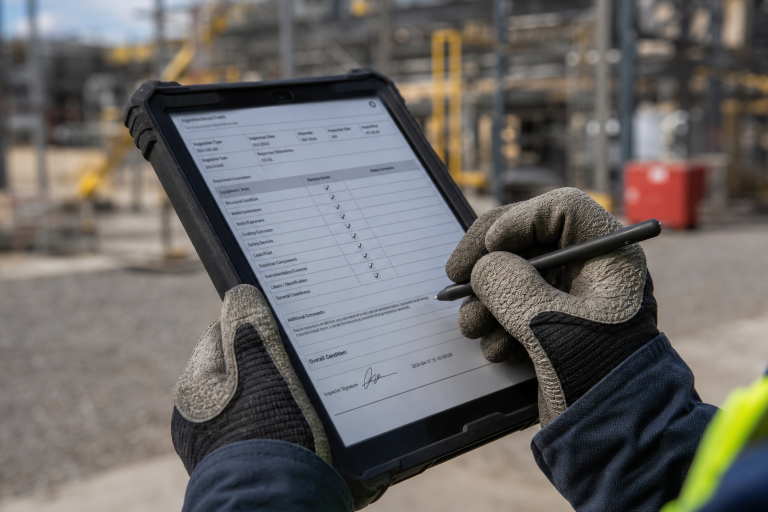
Reliable field data starts with workflows that fit real working conditions. Clear forms, validation rules, and defined ownership reduce missing information. Offline capability is essential for crews working in remote or low-connectivity locations. Photos, timestamps, signatures, and location details can make records easier to verify. Small pilots help teams improve a workflow before introducing it across the organization.Key Takeaways
Field teams often collect the information that keeps projects moving, supports billing, documents inspections, and identifies safety or quality concerns. Yet data can still get lost between the job site and the office when crews rely on paper forms, text messages, emails, and disconnected spreadsheets. Well-designed offline inspection forms field workers can use help teams capture critical details when the work happens, rather than relying on memory or later follow-up.
Better documentation is not only about replacing paper with a mobile device. It requires a practical process that makes the right action easy for the worker, routes the completed record to the right reviewer, and preserves useful information for future decisions. When those pieces work together, field data becomes more complete, timely, and trustworthy.
A field record may be incomplete because instructions were unclear, a form asked for too much at once, or a worker had no connection when trying to submit it. In other cases, the information exists but is scattered across a handwritten checklist, a photo gallery, and a supervisor's inbox. For example, a technician may finish an equipment inspection but send an important repair note by text, leaving the formal record incomplete.
These gaps create avoidable costs. Office staff may need to call the field team for clarification, invoices can be delayed, managers may lack visibility into open issues, and crews may have to revisit a site because a required detail was not captured. For safety-related records, teams should also understand how recordkeeping forms and recording criteria can shape documentation responsibilities in applicable situations.
A reliable workflow is easy to follow, difficult to misunderstand, and simple to review later. Technology can support that goal, but it cannot repair a confusing process on its own. Start by defining what must happen from assignment through completion, review, correction, and storage.
Dependable workflows have several common traits:
Every step has a clear owner.
Field names and response types remain consistent across teams.
High-risk tasks require the information that reviewers genuinely need.
Approvals follow simple rules instead of informal email chains.
Submitted records can be located by job, asset, customer, site, or date.
Corrections are documented instead of silently overwriting the original entry.
Observe the current process from start to finish before building a form or selecting software. Map the assignment, field visit, data capture, review, escalation, and final handoff. Identify who owns each stage, what information they need, and where people re-enter the same data.
Then choose one workflow with a clear business need, such as daily equipment inspections, work completion reports, punch lists, or service visit documentation. A focused starting point makes it easier to see whether the new process reduces delays and improves record quality.
A form that looks organized on a desktop can fail at a job site. Workers may be wearing gloves, standing in bright sunlight, moving between tasks, or documenting work near equipment. Use plain labels, short instructions, and a logical sequence that places the most important questions first.
Use dropdowns for answers that must remain consistent, such as asset status or issue severity. Allow photos when visual proof adds value, and avoid asking for lengthy written explanations during fast-moving tasks. Most importantly, test the form with the people who will complete it. Their feedback will reveal confusing wording, unnecessary fields, and practical obstacles that office teams may not notice.
Validation rules improve data quality at the point of entry. A workflow can require a value for a critical field, restrict an invalid number, show a follow-up question when a problem is found, or request a photo for a failed inspection item. These rules should guide workers, not turn every task into a slow administrative exercise.
Require only what is necessary for safety, quality, billing, compliance, or the next business step. Too many mandatory fields encourage rushed entries, vague notes, and resistance to the new process.
Connectivity is unreliable in rural areas, basements, tunnels, industrial facilities, and large buildings. A dependable field workflow should let workers open forms, capture photos and signatures, save progress, and complete essential documentation without a continuous signal.
Before rollout, confirm what happens when service returns. The system should synchronize records clearly, prevent accidental duplicate submissions, and show whether a record is pending, submitted, or failed. Managers need that status visibility so they can follow up before a missed submission becomes a larger problem.
Completed records should automatically reach the person responsible for reviewing them. The route may depend on the project, location, customer, work type, or the severity of a finding. A simple path could move from worker completion to supervisor review, then to safety or quality staff for serious issues, followed by assignment of an owner and due date for open items.
Clear routing reduces inbox clutter and prevents urgent findings from being buried among routine submissions. It also gives field workers confidence that reported issues will receive attention.
Field information is most valuable when it flows into scheduling, maintenance, billing, project management, and reporting without repeated copying. Use shared identifiers for jobs, assets, sites, and customers so records can be matched across systems. Alerts can notify the right people about urgent conditions, while routine records can feed reports that reveal trends over time.
Strong connections also support traceability. Guidance on securely recording and linking traceability records reinforces the value of consistent data, controlled access, and records that can be followed through a process.
After submission, records should show who completed them, when they were completed, what changed, and who approved the result. Use role-based access, timestamps, version history, retention rules, and secure backups. When a correction is needed, add a note that explains the change instead of altering the record without a trace.
Measure results before and after implementation. Useful indicators include completion rates, missing-field rates, returned forms, review time, time from field completion to office action, repeat visits caused by missing information, and hours spent on manual entry. Faster completion matters, but a shorter form is not automatically better if it removes details needed for sound decisions.
Digitizing a confusing paper process without simplifying it first.
Making every field required, regardless of its value.
Ignoring offline conditions and synchronization failures.
Using different names for the same job, asset, or issue type.
Launching without feedback from field workers.
Sending every record to the same reviewer.
Measuring submission volume without checking the quality of the data.
Days 1 to 5: Choose one high-value workflow and document the current process.
Days 6 to 10: Remove duplicate steps and define the minimum required information.
Days 11 to 15: Build a draft form and test it with field workers.
Days 16 to 20: Add validation, approval rules, and offline requirements.
Days 21 to 25: Run a limited pilot with one crew, site, or department.
Days 26 to 30: Review results, fix weak points, and prepare the next rollout stage.
Better field data does not require an overly complicated process. It requires a workflow that reflects real working conditions, helps people capture the right details, and delivers useful records to the next person in line. Start with one process, test it in the field, measure the outcome, and improve from there. When documentation becomes easier to complete and review, the data becomes easier to trust.
 Supriyo Khan
 Supriyo Khan
 Supriyo Khan
 Supriyo Khan
Want to add a comment?